

Education ERP Implementation is the single most important step a school owner can take to transform their institution from a traditional, paper-heavy environment into a streamlined, data-driven powerhouse. In the modern competitive landscape, simply “having a computer” is not enough. School owners must oversee a comprehensive digital transformation that unifies every department, from the front office and the classroom to the bursar’s desk.
The transition to an education erp software is often viewed with hesitation due to the perceived complexity. However, when managed with a clear roadmap, it becomes a catalyst for growth, reducing administrative burnout and significantly improving the parent-student experience. This guide is designed specifically for school leaders to navigate the journey of adopting an erp system for educational institutions with confidence and clarity.
Planning for Your Education ERP Implementation
A successful Education ERP Implementation begins long before the software is actually installed. It starts with a clear vision from the leadership.
A. Identifying Pain Points and Strategic Goals
Before looking at features, school owners must ask: “What is currently slowing us down?”
- Is it the manual reconciliation of tuition fees?
- Is it the lack of real-time communication with parents?
- Or is it the difficulty in generating state-mandated reports?
By defining these goals early, you ensure that the school management erp you choose is configured to solve your specific problems rather than just providing generic tools.
B. Assembling the Implementation Dream Team
While you are the visionary, you need a dedicated team to manage the “on-the-ground” transition. This team should include:
- The Project Lead: A senior administrator with the authority to make decisions.
- The Finance Liaison: To ensure the education erp correctly handles fee structures and payroll.
- The Academic Lead: To oversee the migration of student records and gradebooks.
- An IT Coordinator: To manage the technical requirements and vendor communication.
C. The Importance of Data Readiness
The most common reason for a delayed erp school rollout is “dirty data.” Before the Education ERP Implementation begins, your staff must audit existing records. Cleaning up student names, parent contact details, and historical financial records ensures that the new system starts with a solid, accurate foundation.
Understanding the Building Blocks of Education ERP Implementation
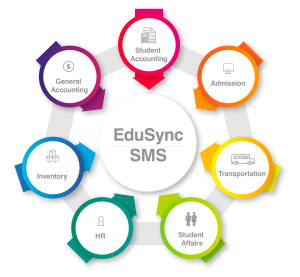
To truly appreciate the scope of an Education ERP Implementation, one must understand the various school ERP modules that make up a complete system. These modules are the functional units that handle specific administrative tasks.
A. Admissions and Enrollment Module
This module digitizes the entire student journey, from the initial inquiry to final registration. It eliminates the need for physical forms, allowing parents to upload documents and pay registration fees online, thereby creating a professional first impression.
B. Student Information System (SIS)
At the heart of any school erp, the SIS manages the “life cycle” of a student. This includes attendance tracking, disciplinary records, health information, and family history. It ensures that every staff member has a “single source of truth” regarding any student.
C. Finance and Fee Management
For school owners, this is often the most critical module. It automates the generation of invoices, tracks late payments, sends automated reminders to parents, and manages the school’s overall budget. A robust school management erp should provide real-time cash flow visibility.
D. Human Resources and Payroll
Managing a large teaching staff is complex. This module handles teacher attendance, leave management, performance appraisals, and the automated generation of payslips, ensuring compliance with local labor laws.
E. Learning Management System (LMS)
Modern school erp solutions often include or integrate with an LMS. This allows teachers to share digital resources, conduct online quizzes, and manage gradebooks within the same ecosystem used for administration.
F. Inventory Management
Managing a school’s physical assets, from library books and laboratory equipment to classroom furniture and IT devices, is a massive undertaking that often leads to hidden financial leakage. An inventory management module within your school management erp automates this by providing a centralized database where every item is logged, tracked, and monitored in real-time.
G. Transportation Management
Student safety is the highest priority for any educational institution, and a transportation management module is essential for maintaining a secure, professional, and accountable fleet. Integrated directly into your education erp software. This allows administrators to monitor bus speeds and ensure drivers adhere to designated stops, while simultaneously providing parents with total peace of mind.
H. Examination and Result Management
Automating the generation of report cards and transcripts saves thousands of hours of manual labor for teachers. This module handles complex grading scales and ensures that results are shared securely with parents at the click of a button.

The Step-by-Step Roadmap for Education ERP Implementation
A structured, phased approach is the only way to prevent the “digital chaos” that often accompanies new technology. By following this meticulous roadmap, school owners can ensure that their Education ERP Implementation is not just a software installation, but a successful institutional transformation.
1. System Configuration and Customization
In this initial stage, the Education ERP Implementation is essentially teaches the rules of your school. Every institution has its own unique DNA, and the configuration phase ensures the system reflects that.
- Academic Structure: Defining your academic years, terms, semesters, and house systems.
- Permissions and Roles: Establishing a clear staff hierarchy. Who can view financial data? Who can edit grades? Setting these permissions early ensures data security and internal privacy.
- Grading and Assessment: Configuring the specific grading scales, GPA calculations, and report card templates used by your school to ensure the school management erp produces accurate transcripts from day one.
2. Strategic Data Migration and Integrity
Data is the lifeblood of your school. Moving it from fragmented spreadsheets or legacy software into a new erp system for educational institutions is a delicate operation.
- Data Mapping: Ensuring that “Student Name” in your old system matches perfectly with the “Full Name” field in the new school erp.
- Security Protocols: Your vendor must provide a secure, encrypted environment for this transfer to protect sensitive student and financial records.
- Integrity Checks: This is the time to eliminate duplicates and “clean” the data. Remember the golden rule of Education ERP Implementation: Garbage in, garbage out. Starting with clean data ensures your future reports are flawless.
3. User Acceptance Testing (UAT): The Dress Rehearsal
Before the system is rolled out to the entire community, your core Education ERP Implementation team must perform a “stress test” in a sandbox environment.
- Scenario Testing: Mock-enrolling a student, generating a fee invoice, and recording a disciplinary action to see if the workflow is logical and error-free.
- Bug Identification: This phase allows you to catch any configuration errors before they affect real parents or students.
- Workflow Validation: Ensuring that the school ERP modules communicate with each other correctly (e.g., does paying a fee in the Finance module automatically update the student’s status in the Registrar’s module?).
4. Role-Based Comprehensive Staff Training
A system is only as powerful as the people who operate it. For a successful Education ERP Implementation, training must be tailored to the specific daily tasks of different staff groups.
- For Teachers: Focus on attendance, grade books, and communication tools within the Education ERP Implementation.
- For the Bursar/Finance Office: Intensive training on fee collection, automated invoicing, and financial reporting.
- For School Owners & Principals: Training on the executive dashboard, learning how to pull real-time data to make informed decisions about enrollment trends and cash flow.
5. The Go-Live Phase and “Hyper-care” Support
The “Big Day” should be planned with precision. Transitioning to the live environment is best done during a period of low administrative stress, such as a mid-term break or the summer holidays.
- Phased Rollout: Some schools choose to go live with the staff modules first, followed by the parent portal a few weeks later.
- Support Desk: After Education ERP Implementation and during the first week of live operations, a dedicated support team (internal or from the vendor) must be available to resolve minor “new user” queries instantly, maintaining high morale and confidence in the new system.
Overcoming Challenges in Your Education ERP Implementation
Even with the best education erp software, the human and technical elements of change can present hurdles. Recognizing these early allows school owners to lead their teams through the Education ERP Implementation.
A. Managing Resistance to Change
The greatest barrier to Education ERP Implementation isn’t usually the technology; it’s the human habit. Staff members who have used paper logs for 20 years may feel threatened or overwhelmed.
- The Solution: Transparency and “The Why.” Highlight the personal benefits for the staff: less overtime during report card season, no more manual fee chasing, and instant access to information. When staff see the system as a “helper” rather than a “monitor,” adoption rates skyrocket.
B. Navigating Technical and Infrastructure Barriers
For an online education management system to work, the school’s “digital foundation” must be solid.
- Connectivity: Ensure your campus has reliable internet. However, most modern school erp solutions are cloud-based, meaning they are optimized to work even on moderate bandwidth and require no expensive on-site servers.
- Device Accessibility: Choose a system that is mobile-responsive, allowing teachers to take attendance on a tablet or parents to pay fees via a smartphone app.
C. Preventing “Scope Creep” and Budget Overruns
In the excitement of a new school management erp, it is tempting to try to implement every single feature at once—from library management to GPS bus tracking.
- The Solution: Prioritize your “Core Needs” first. Focus on the essential school ERP modules (Admissions, Finance, SIS) to get the school running smoothly. Once the core is stable and the ROI is visible, you can gradually expand to secondary modules. This keeps the implementation on time and within budget.
Why EduSync is the Best School ERP for a Successful Implementation
Selecting the right partner is the most critical factor in the success of your Education ERP Implementation. While many options exist, EduSync from Syncology is widely recognized as the best education erp software for institutions that prioritize ease of use, high-level security, and professional localized support.
EduSync stands out because it was built specifically with the needs of school owners and directors in mind. It doesn’t require an IT degree to navigate; the interface is intuitive, professional, and mobile-first. As a comprehensive education erp, EduSync integrates all the necessary school ERP modules—from finance and inventory to advanced transportation tracking—into one seamless, synchronized experience.
What truly makes EduSync the best school ERP is its dedicated implementation methodology. We don’t just “sell” you software; we partner with you to ensure a high adoption rate. Our team assists with delicate data migration, provides tailored training for your specific departments, and offers 24/7 support to ensure that your school never experiences a day of downtime. By choosing EduSync, you are choosing an erp school system that enhances digital learning while simultaneously removing the administrative weight from your shoulders.
Conclusion: Your Legacy Starts with a Successful Education ERP Implementation
The decision to move toward a digital future is an investment in your school’s long-term legacy. A successful Education ERP Implementation does more than just organize your data; it builds deep trust with parents, empowers your teachers to focus on instruction, and gives you, the owner, the absolute clarity needed to make strategic growth decisions.
By focusing on the right school ERP modules, following a structured roadmap, and partnering with a world-class erp system for educational institutions like EduSync, ensures that your school remains at the cutting edge of educational excellence. Don’t let manual, paper-based processes hold your school back from its true potential in the digital age.
Would you like to see how EduSync can transform your institution?