

The decision to adopt an ERP for Schools is a fundamental commitment to operational excellence. It signifies moving past the inefficiency of fragmented, siloed applications, where finance, admissions, and academics rarely communicate, to embrace a single, unified digital environment. For school administrators and leadership, the implementation phase, particularly the first 90 days, is the most crucial period, laying the groundwork for a successful return on investment (ROI).
This guide provides a transparent, phase-by-phase roadmap of what to expect, ensuring you maintain momentum and mitigate risks during the initial adoption of your new educational management software. A successful integration requires meticulous planning, disciplined execution, and strong collaboration between your staff and the vendor. We will break down this complex project into three manageable 30-day sprints, demonstrating how careful planning in these first 12 weeks is the key to unlocking broader school system management success and achieving your vision for efficiency and strategic resource allocation.
The journey begins not with technology, but with people and preparation, making the first 30 days critical for setting the right foundation for your ERP for Schools.
Setting ERP for Schools phase 1: The First 30 Days – Laying the Foundation (Setup & Data Readiness)
The first month is dedicated to establishing governance, technical infrastructure, and, most importantly, data readiness. Without clean, mapped data, the most sophisticated ERP for Schools will fail.
A. Project Scoping and Governance (Days 1-7)
- Key Action 1: Assembling the A-Team: You must immediately identify the core internal implementation team. This isn’t just IT; it must include high-level representation from Finance (for School Accounting), Admissions (for the Student Management System), and Academic Leadership. Appoint a strong internal Project Manager; this person is the critical liaison with the vendor.
- Key Action 2: Defining the “Why”: The vendor needs to understand your critical goals. Finalize Key Performance Indicators (KPIs) and scope validation. What must be live on Day 91? Is it automated tuition invoicing? Is it simplified report generation? Defining these non-negotiables provides focus for the entire implementation of your ERP for Schools.
B. Technical Setup and Environment (Days 8-15)
- Key Action 3: Provisioning and Access: This involves setting up the secure cloud environment. Focus immediately on Segregation of Duties by establishing initial user roles and access permissions. Who has the authority to approve purchases? Who can modify student enrollment records? Defining these controls now is crucial for long-term security and compliance within your new school management software.
C. The Critical Data Cleanse and Mapping (Days 16-30)
- Key Action 4: Data Auditing: This is the most labor-intensive but critical administrative task. You must audit and cleanse legacy data. This means removing duplicate student records, ensuring all staff payroll records are accurate, and verifying the integrity of old financial ledgers. Garbage in, garbage out. The quality of the new ERP for Schools relies entirely on the cleanliness of the migrated data.
- Key Action 5: Mapping Legacy to ERP: You must translate the data fields from your old systems into the structured format required by the new ERP for Schools. For instance, ensuring your old student categories map correctly to the new Student Management System structure, and that your existing revenue codes align with the new Chart of Accounts in the School Accounting module. Planning the phased migration strategy (e.g., starting with admissions before full finance integration) is finalized during this period.
Setting ERP for Schools phase 2: Days 31-60 – Configuration, Training, and Process Mapping
The second phase is where the heavy lifting of configuration and adoption begins. Your focus shifts from technical readiness to functional mastery and user competency within the ERP for Schools.
A. Core Module Deep Configuration (Days 31-45)
- Key Action 6: Financial Structure Setup: The Finance team works closely with the vendor to configure the Chart of Accounts, define cost centers (allowing detailed tracking of spending per department), and set up the academic fee matrix. Integrating the payment gateway during this period ensures the School Accounting module is ready to accept and reconcile transactions from day one.
- Key Action 7: Academic Structure Configuration: The Admissions and Academic teams configure the Student Management System module. This includes defining academic calendars, grading scales, course catalogs, class periods, and customizing the entire admission workflow (from application submission to final enrollment). This is where the core logic of your school is digitized.
- Key Action 8: HR Module Basics: Setting up the organizational hierarchy, defining job roles, and inputting initial payroll and benefits parameters ensures smooth staff management and accurate expense allocation across the entire school system management infrastructure.
B. Hands-On Training and Change Management (Days 46-60)
- Key Action 9: Role-Based Training: Generic training is ineffective. The vendor must provide deep-dive, practical, role-based training. Finance staff must train intensely on ledger entries and reporting, while teachers train on grade book usage and attendance tracking. This tailored approach dramatically improves user adoption of the ERP for Schools.
- Key Action 10: Process Alignment and Gap Resolution: The internal team maps current workflows (e.g., how a new technology request is approved, or how a late payment is processed) to the new ERP for Schools features. This exposes gaps: areas where manual work must be updated, or where the educational management software offers a more efficient automated process. Resolving these gaps early is crucial.
- Key Action 11: Sandbox Testing: Key users must repeatedly practice critical real-world scenarios in a “sandbox” (non-live) environment. They should simulate processing a tuition payment, updating a student address, or processing a staff resignation. This practical, risk-free practice builds the confidence needed for Go-Live.
Setting ERP for Schools phase 3: Days 61-90 – Finalizing Migration and Go-Live Preparation
The final 30 days are a focused sprint dedicated to validation, reconciliation, and moving the institution from reliance on the old system to readiness for the new ERP for Schools.
A. Final Data Validation and Migration (Days 61-75)
- Key Action 12: The Cut-Over Data Migration: This is the moment when the final, clean, comprehensive data is migrated into the live environment. It’s a high-stakes moment requiring careful scheduling (often done over a weekend or holiday break).
- Key Action 13: Reconciliation and Verification: This is a mandatory checkpoint. The Finance team must reconcile all opening balances (cash, receivables, payables) between the old system and the new ERP for Schools to the exact penny. The Admissions team must verify every active student’s enrollment status. This verification ensures absolute data integrity when the system goes live.
- Key Action 14: Stress Testing: Simulating peak usage scenarios (e.g., bulk fee invoicing to all parents, 50 users logging in concurrently, running complex financial reports) confirms that the infrastructure of the ERP for Schools can handle the school’s actual operational load without crashing or slowing down.
B. Communications and Go-Live Strategy (Days 76-90)
- Key Action 15: Communications and Support Plan: Finalize the internal communication plan. Define the Hypercare Period—a two-week intense, elevated support structure immediately following the launch where staff know exactly who to call (or email) if they encounter an issue with the new school management software.
- Key Action 16: The Soft Launch: A phased rollout is often safer. Instead of launching every module simultaneously (a “Big Bang”), consider a soft launch focusing on critical functions first (e.g., launch the Student Management System for attendance and reporting, then integrate the School Accounting module two weeks later). This minimizes institutional risk.
Setting ERP for Schools Benefits Beyond the First 90 Days
The intense effort invested during the initial 90-day implementation of your ERP for Schools is not merely about replacing old software; it is about establishing a robust infrastructure for future strategic growth. The true, long-term Return on Investment (ROI) begins to materialize after this critical foundation is successfully laid. Once the system achieves operational stability and users are proficient in managing workflows within the unified environment, the institution can leverage the wealth of unified data for genuine strategic gains, moving management from a reactive state to a proactive, visionary one.
The first major benefit is the ability to engage in data-driven decision-making with unprecedented accuracy. The integrated nature of the ERP for Schools, linking the Student Management System directly to School Accounting, allows administrators to instantly generate comprehensive, cross-functional reports. This means leadership can accurately forecast cash flow up to a year in advance and model the financial impact of various tuition increases or enrollment shifts (Scenario Planning) in real-time. This predictive capability is essential for prudent financial planning and managing institutional liquidity.
Furthermore, the ERP for Schools profoundly transforms resource allocation. No longer is budget planning based solely on historical spending; rather, it is informed by granular, programmatic costs. The system enables detailed Program Costing, allowing the school to determine the true cost of running specific programs (e.g., special education services, advanced STEM courses, extracurricular sports). This visibility is vital for assessing the effectiveness of capital expenditures. For example, tracking the expense and utilization of smart learning tools, from initial purchase to maintenance costs, per student or academic department, allows for a precise assessment of educational ROI. This empowers administrators to strategically redirect funds where they yield the greatest educational impact, elevating the entire school system management strategy.
Ultimately, by automating redundant, manual administrative tasks (like data entry and reconciliation), the ERP for Schools significantly frees up valuable staff time. This enables human resources to shift their focus away from transactional processing toward high-value, strategic initiatives directly supporting the educational mission, culminating in superior overall school management software utilization and operational excellence. This foundational stability is the true measure of success achieved beyond the first 90 days.
The Integrated Solution: Syncology EduSync ERP
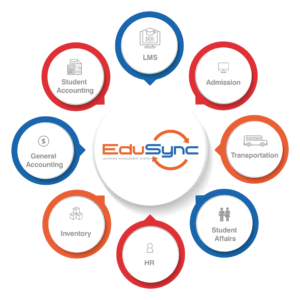
For institutions seeking a partner capable of executing this 90-day and less plan successfully, the Syncology EduSync system provides a complete solution. Designed as a singular, unified platform, integrated with Odoo, Moodle, and Microsoft, EduSync serves as a robust ERP for Schools, centralizing all operations from the Student Management System to the General Accounting module. By eliminating fragmented applications, EduSync ERP guarantees real-time data flow, streamlining the implementation process and accelerating the journey to operational excellence and strategic school system management.
Conclusion: The Foundation is Set for a Smarter Future
The initial 90-day period of implementing an ERP for Schools is defined by planning, data discipline, and commitment. By following this roadmap, establishing strong governance, accurately cleaning and migrating data, and investing heavily in role-based training, administrators lay the essential foundation for a unified, efficient, and compliant digital future. Your journey to operational excellence is just beginning, and the success of the first 90 days guarantees your institution is ready to leverage technology for smarter school system management.